Screenshots
See it in action.
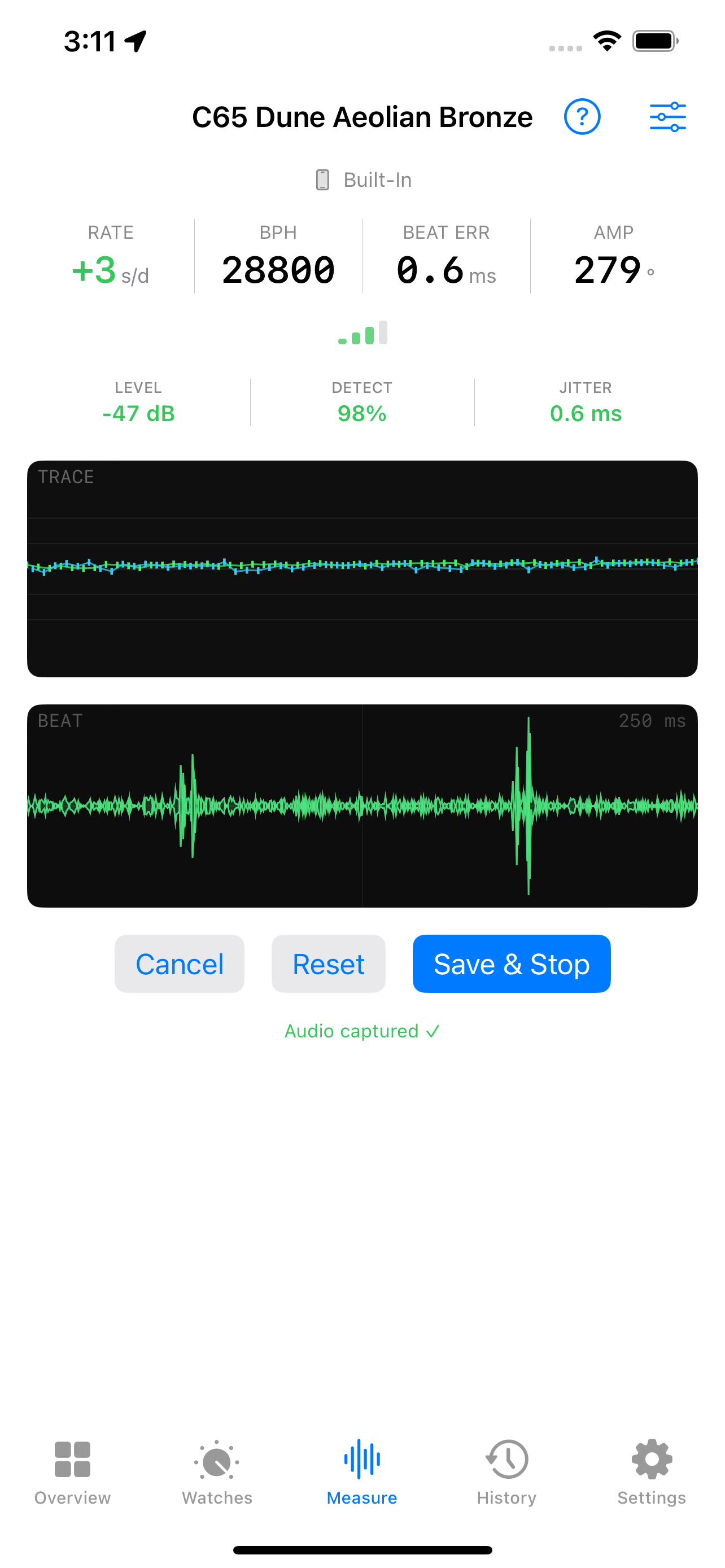
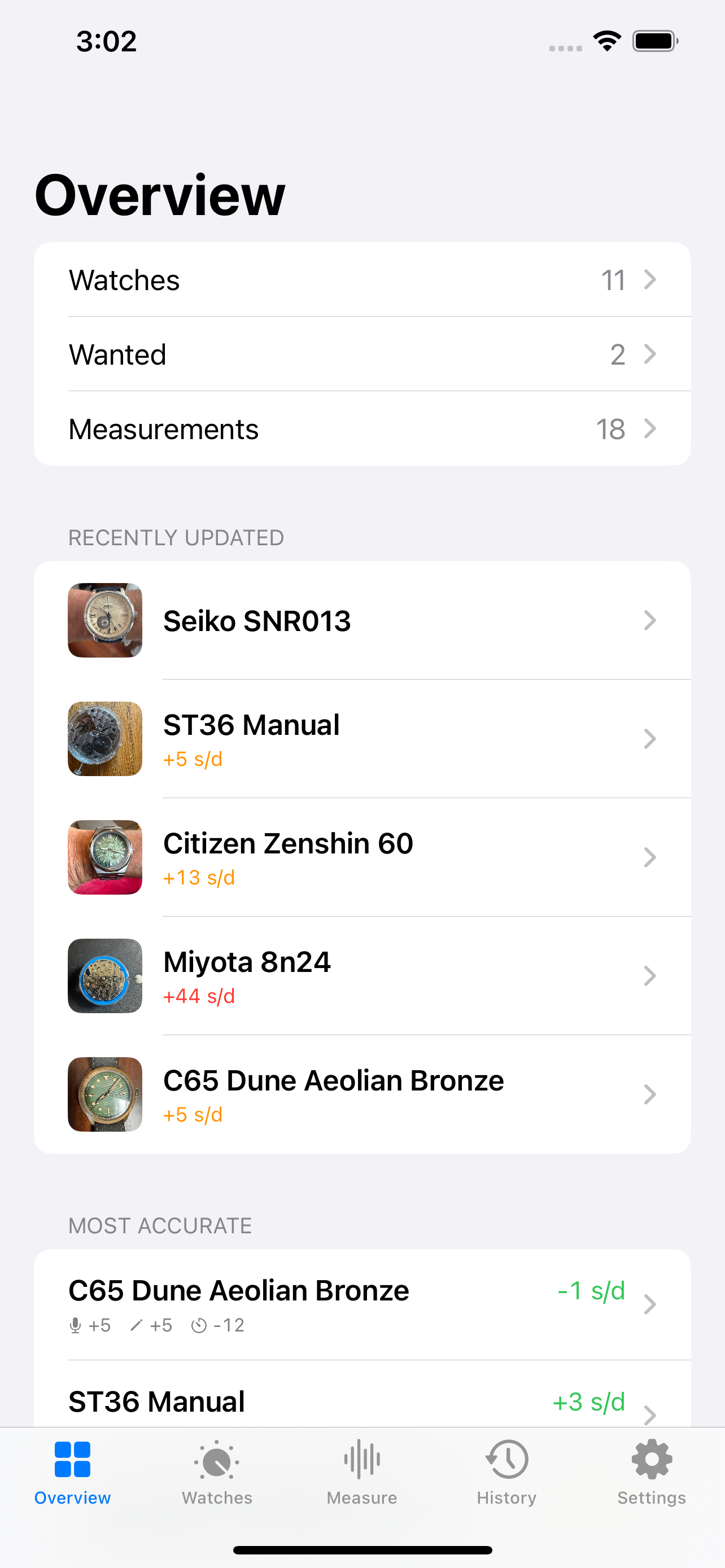
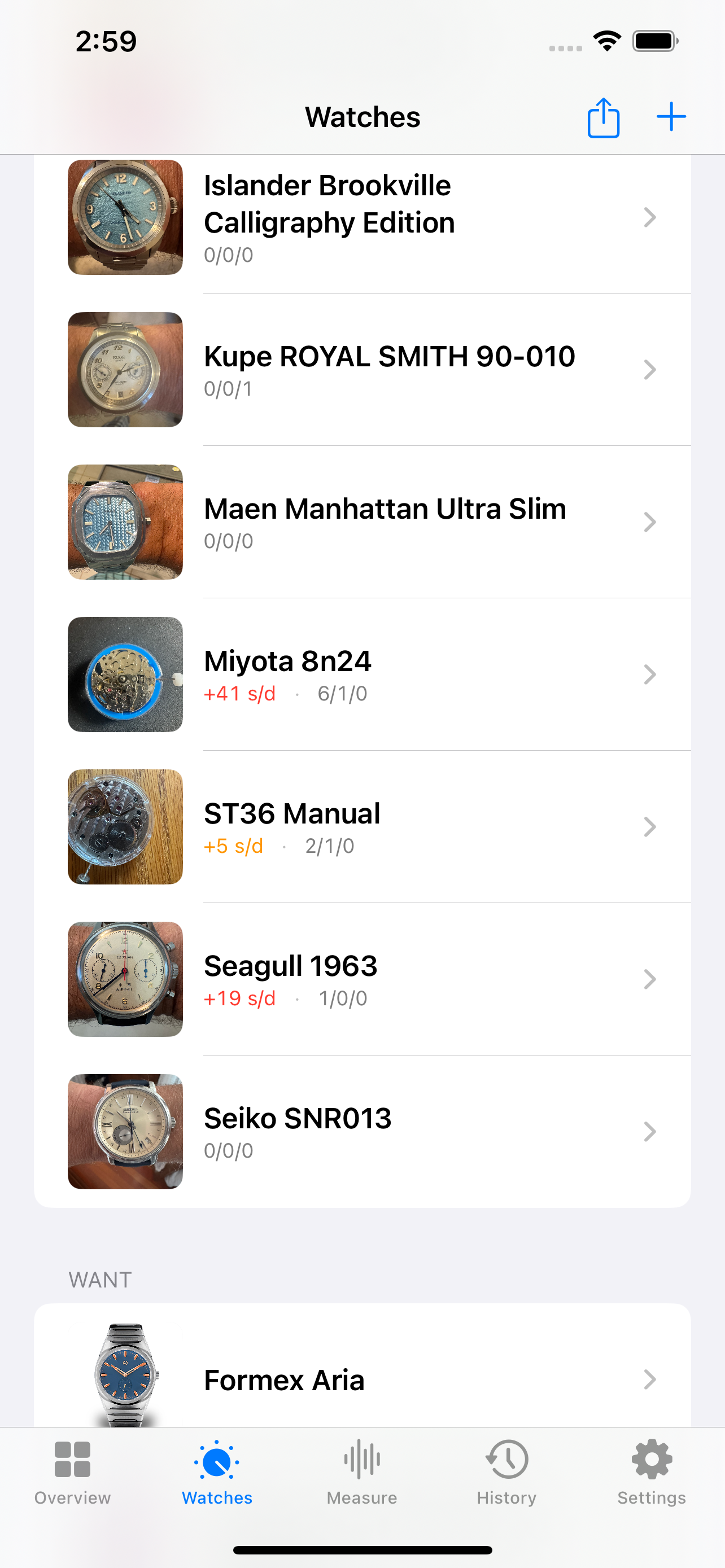
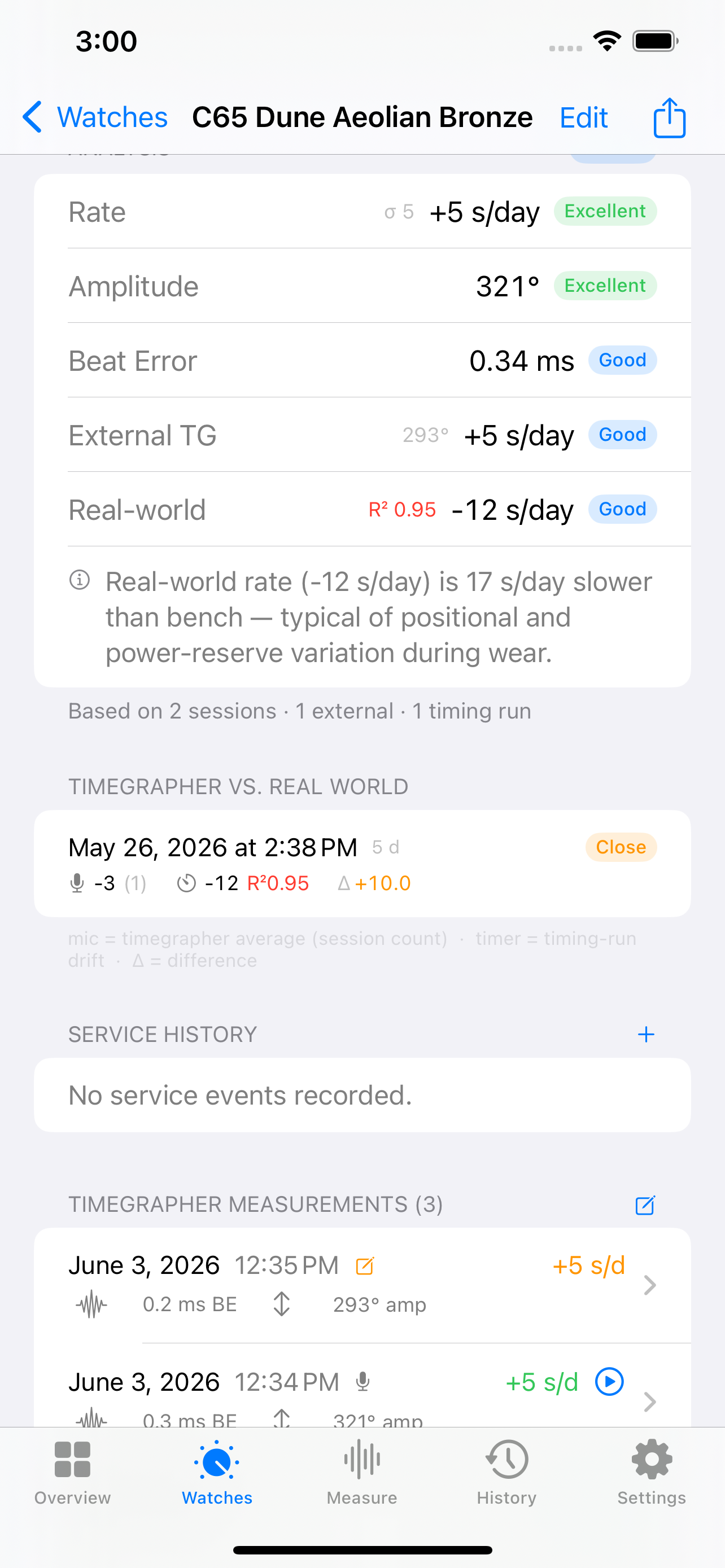
For iPhone
Calibre listens to yours — and tells you exactly how well it's keeping time.
The differentiator
Watchmakers use a device called a timegrapher to diagnose and tune mechanical movements. Until now, that meant a dedicated machine costing hundreds of dollars. Calibre brings the same measurement to your iPhone.
Your watch's balance wheel swings back and forth thousands of times a day, each swing producing a faint tick sound. Calibre listens to those ticks through your iPhone microphone, analyses the timing, and computes the numbers that matter.
No special equipment required. Hold your phone near the case and results appear within seconds.
Features
Store every watch in your collection with photos, specs and notes. Add watches from a product URL or web search — Calibre extracts the specs automatically. Filter by status, export as PDF or CSV.
Track each watch over months and years. See how rate deviation changes with wear, position, and servicing. Spot trends before they become problems.
Hold your iPhone near the case — or clip on a contact mic for even cleaner results. Rate, amplitude, beat error, and signal quality update live.
Mechanical watches run differently in different positions. Measure dial-up, crown-up, and more to understand how your watch behaves on the wrist.
Paste a product URL or search the web from inside the app. Calibre scrapes the page for specs — dimensions, weight, price, caliber, water resistance — and lets you review before applying.
Log service events and see how accuracy changes before and after service. Know when your watches are due for attention.
Run multi-hour unattended measurements. One reading per minute, plotted over time. A silence watchdog ends the run cleanly if the watch is removed.
Generate a clean one-page PDF with your watch photo, full specifications and a performance summary. Save directly to the Files app.
Tap a caliber name and Calibre fills in the technical specs automatically — beat rate, lift angle, jewels, power reserve — for 85+ common movements.
How it works
Paste a product URL and Calibre fills in the specs for you — or search the web from inside the app. Add a photo, enter the caliber name and the database fills in the rest.
Place your iPhone near the case — on a table with the watch face-up works well. Select the dial position and tap Start.
Within about 10 seconds Calibre locks on to the tick pattern and displays rate, amplitude, and beat error. The paper-tape trace appears in real time.
Save the reading to the watch's history. Repeat over days and weeks to build a picture of how the watch performs — and whether anything changes.
Screenshots
FAQ
Mechanical watches — both automatic (self-winding) and manual-wind. Any watch with a balance wheel and hairspring: vintage or modern, dress or sport, Swiss or Japanese.
Quartz and spring drive watches work differently and don't produce the kind of tick sound Calibre listens for, so can't be measured by the timegrapher. But they can still be added to the collection and manual timing runs will still allow you to measure their accuracy.
A timegrapher is a device that listens to the tick of a mechanical watch and measures how accurately the balance wheel is oscillating. Professional watchmakers use them to diagnose and tune movements before and after service.
The classic result is a paper-tape trace — a line that scrolls sideways as the watch runs. A flat line means consistent timing; a sloped line means the watch is gaining or losing; a wavy line means the timing is irregular. Calibre draws the same trace on your screen in real time.
No — the built-in iPhone microphone works, especially for uncased movements in a quiet environment. A wired microphone will help significantly with watches as the volume will be dampened by the case and their may be echoes. That said, microphone choice has a large impact on signal quality.
Recommended, best to least:
Generic knock-off wired earbuds without MFi certification are a common trap — their microphone capsules are built for voice calls and typically produce a signal worse than the built-in mic. If beat detection is unreliable with a third-party wired mic, that is almost certainly why.
Cased watches are also significantly harder to measure than bare movements. The caseback, gaskets, and crystal absorb 20–40 dB of acoustic energy. Allow extra time for readings to stabilise, and use a contact mic on the caseback wherever possible. You can get a rough estimate about how well a watch is likely to work by listening to the watch yourself. If you can barely hear the tick tock, it is going to be hard for the app to get a good measurement,
Rate deviation is how many seconds per day a watch gains or loses relative to
perfect time. A reading of +4 s/d means the watch gains four seconds
every 24 hours. A reading of −2 s/d means it loses two seconds a day.
COSC chronometer certification requires a rate deviation between −4 and +6 s/d tested across five positions. Many modern watches achieve better than ±2 s/d from the factory. Vintage watches often run a wider range and may drift more as service intervals lengthen.
Amplitude is the angle — in degrees — through which the balance wheel swings on each beat. A fully wound, healthy mechanical watch typically runs between 250° and 310°. As the mainspring unwinds, or as lubricants age and friction increases, amplitude drops.
Low amplitude (below around 200°) is a sign the movement needs attention: the watch may stop in certain positions, rate deviation will increase, and it may be more sensitive to shocks. Monitoring amplitude over time is one of the clearest early indicators that a service is due.
Calibre estimates amplitude acoustically by averaging across many beats. Results are sensitive to microphone type and placement — a difference of 10–30° vs. a hardware timegrapher is typical. Use the reading as a relative indicator and trend monitor rather than an absolute value.
Beat error measures the symmetry of tick and tock. In a perfectly adjusted watch the interval from tick to tock equals the interval from tock to tick. Beat error is the difference between those two intervals, in milliseconds.
A small beat error (under 0.5 ms) is generally fine. A larger value means the beat is "uneven" — the escapement is not centred. Beat error above about 1.0 ms can affect rate stability and, in extreme cases, cause the watch to stop in dial-up or dial-down positions.
Preview feature: beat error is derived acoustically and can differ noticeably from a hardware timegrapher, particularly for movements where one pallet direction produces a longer acoustic ring than the other.
Rate deviation is typically accurate to within a few seconds per day compared to a hardware timegrapher, provided beat detection is consistent (above ~90%) and the timing jitter is low. The signal quality indicator in the app shows you whether conditions are good enough to trust the reading.
Amplitude is estimated by averaging the acoustic impulse across many beats, which produces steadier readings than single-beat methods. Beat error can be skewed by movements whose two pallet strokes have different acoustic envelopes. Both readings are useful as relative indicators and trend monitors, but may differ from a dedicated hardware timegrapher.
The free tier includes up to two watches, each with one live timegrapher session shown. Manual timing runs and external timegrapher entries are unlimited. Calibre Pro removes the watch limit so you can track an unlimited collection with full history and trend charts.
Measurement data stays on your device. Audio is processed locally and stored as a short clip for your own playback — it is never uploaded. Calibre has no account system.
The only network requests are ones you initiate: fetching watch specs from a product URL, searching the web for a watch, or downloading product images. These go directly to the page you chose.
Visit calibrewatch.app/support for common fixes and troubleshooting steps — most issues are resolved by resetting to recommended defaults or adjusting microphone placement.
If the guides don't help, email support@calibrewatch.app. Include the watch type, BPH if known, which microphone you're using, and what the LEVEL and DETECT indicators show. A screenshot helps a lot.
Get started
Free to download. Two watches and unlimited manual timing. No account required.